Olymptrade Deposit via Kasikorn Bank and Bank Card
Writen By

Online Trading Platform Researcher and Guide Writer
Researches broker platforms and trading account Systems.
Adding funds from a local Thai bank or from a bank card often stalls because of mismatched payment details, unsupported card types, or transfer limits. If you plan to deposit with Kasikorn Bank or a debit/credit card, it helps to know which currencies are accepted, how payment names must match your trading account, and which transaction fields to include so the transfer posts without manual intervention.
This article lays out the step-by-step deposit flow for Kasikorn Bank transfers and card payments on Olymptrade, covering accepted card networks, minimums and limits, typical processing windows, and what to do if a deposit is delayed or rejected. Practical tips on receipts, 3D Secure checks, and when verification may block fund availability are included so you can fund your account with fewer delays and faster support resolution.
This article lays out the step-by-step deposit flow for Kasikorn Bank transfers and card payments on Olymptrade, covering accepted card networks, minimums and limits, typical processing windows, and what to do if a deposit is delayed or rejected. Practical tips on receipts, 3D Secure checks, and when verification may block fund availability are included so you can fund your account with fewer delays and faster support resolution.

How to Top up an Account Using a Bank Card in Thailand?
To top up your account using your Visa or Mastercard bank cards, you should have a card of any commercial bank in Thailand. It is a mandatory requirement that the bank card has your name on it.The minimum deposit on Olymptrade is only $19.
The maximum one-time deposit that you can make is $5000.
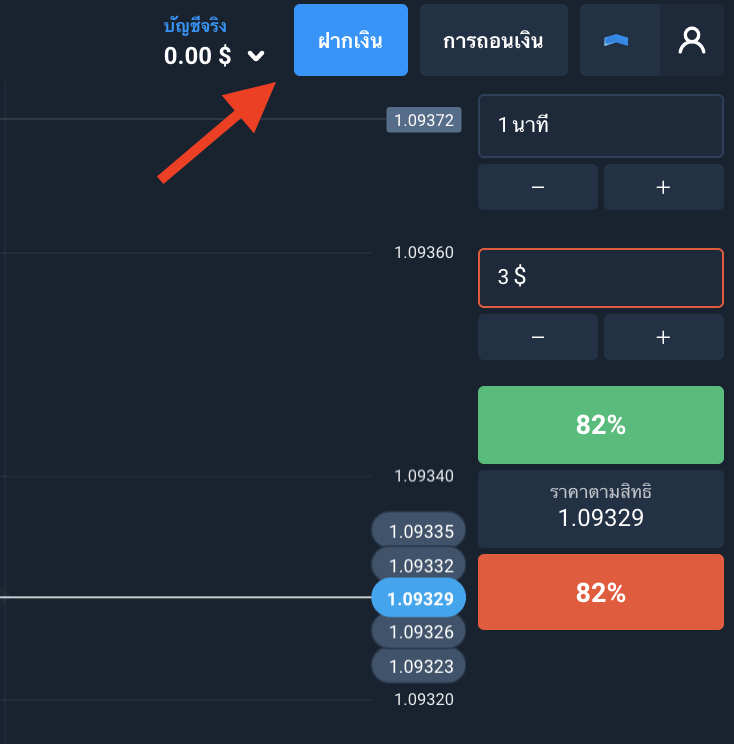
Step 1. Select Deposit on the trading platform
Step 2. Select Banks cards in the Means of Payment menu. Then enter the amount (no less than $19)
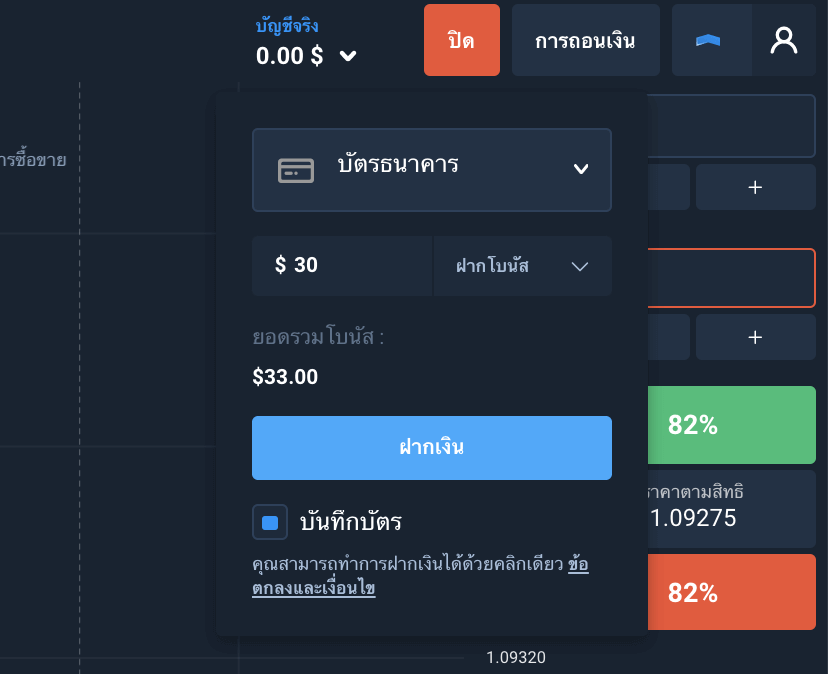
You can get additional funds for trading on the platform as bonuses. The bonus amount depends on the one of your deposit: the larger the deposit, the larger the bonus.
At this step, you can also enter a promo code if you have any.
Step 3. Enter your bank card details in a new window:
- Number
- Cardholder name (exactly the way it is typed on the front of the card)
- Validity
- CVV
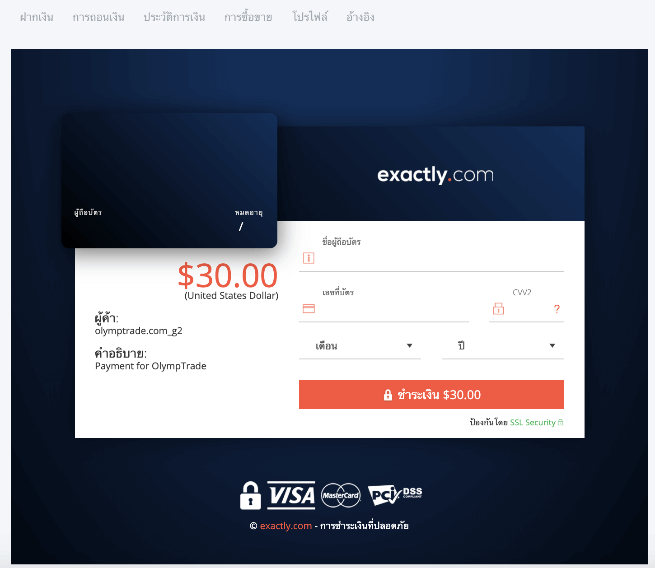
At the last step, you will receive a text message with a code to confirm the transaction. Enter it. Money will be credited to your Olymptrade account immediately.
Facing Difficulties While Topping up Using a Bank Card?
If you are sure that there are enough funds on your bank card to transfer to Olymptrade, but the payment cannot be made, please check the following:
- Your card cannot be used for making payments online. It happens. You can go to your bank and ask for permission to make purchases online. If you can log in to your bank account, you might be able to activate this option yourself.
- You have entered incorrect card/SMS code data or the payment page’s waiting period has expired. To rule out this reason, try to make a payment again.
Making a Deposit on Olymptrade Using an E-wallet
- To protect yourself from any troubles with making a deposit using a bank card, we suggest that you do the following:
- Sign up for any of these electronic payment systems: Skrill, Neteller or WebMoney.

- Top up the selected digital wallet using your bank card.
- Then go back to the platform and deposit money into your Olymptrade account using a Skrill, Neteller or WebMoney e-wallet.
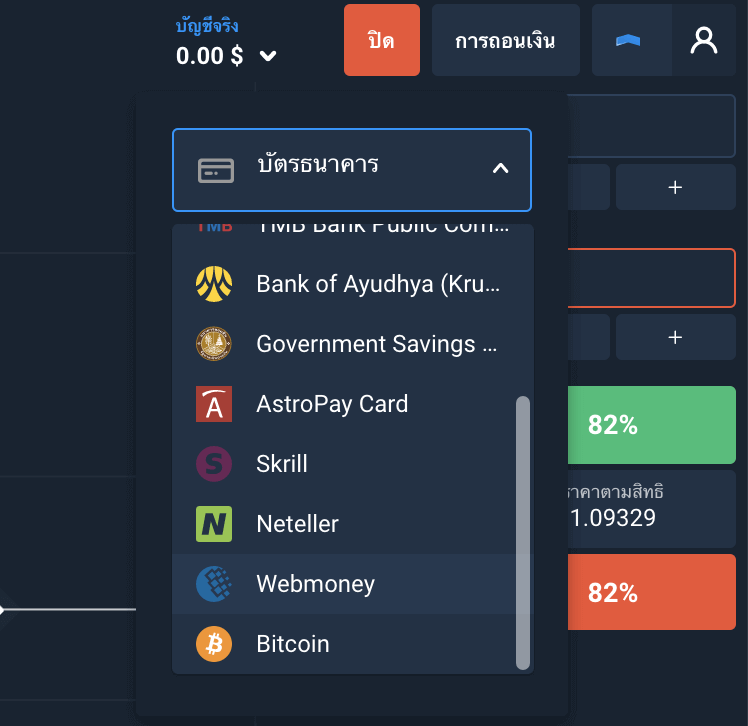
There are two reasons why the broker’s clients are actively using this method of making a deposit.
Firstly, because there are plenty of methods to top up electronic wallets: from a simple bank transfer to a cryptocurrency payment.
Secondly, payment systems process fund transfers to electronic wallets much faster than by the same banks. Which means you get an opportunity to use your profit faster.
How Do I Make a Deposit Through Kasikorn Bank?
If you are making a payment online via Kasikorn Bank:- The minimum deposit is $19
- The maximum one-time deposit is $15,000
The order of making a deposit on the platform is almost the same as that with the bank cards:
Step 1. Topping up through Kasikorn Bank
- Select “Deposit” on the platform
- Select “Kasikorn Bank” as a means of payment
- Specify the amount of your deposit (the minimum is $19, the maximum is $15 000)
- Select your bonus or refuse to use it. Enter the promo code if you have any.
- Click on “Deposit”
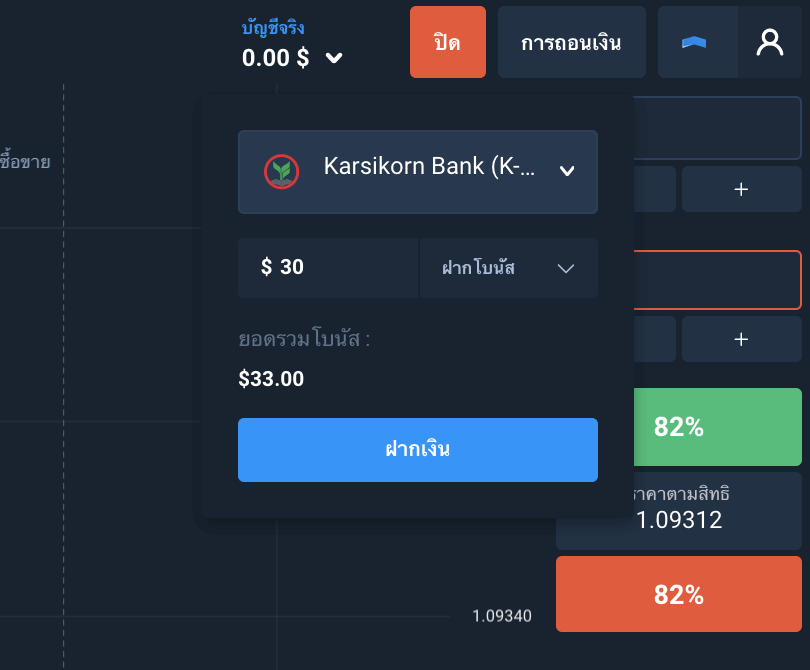
Step 2. Topping up through Kasikorn Bank
- The Kasikorn Bank authorization form will open; enter your login and password to access you bank account.
- You will get a confirmation code via SMS. Enter it.
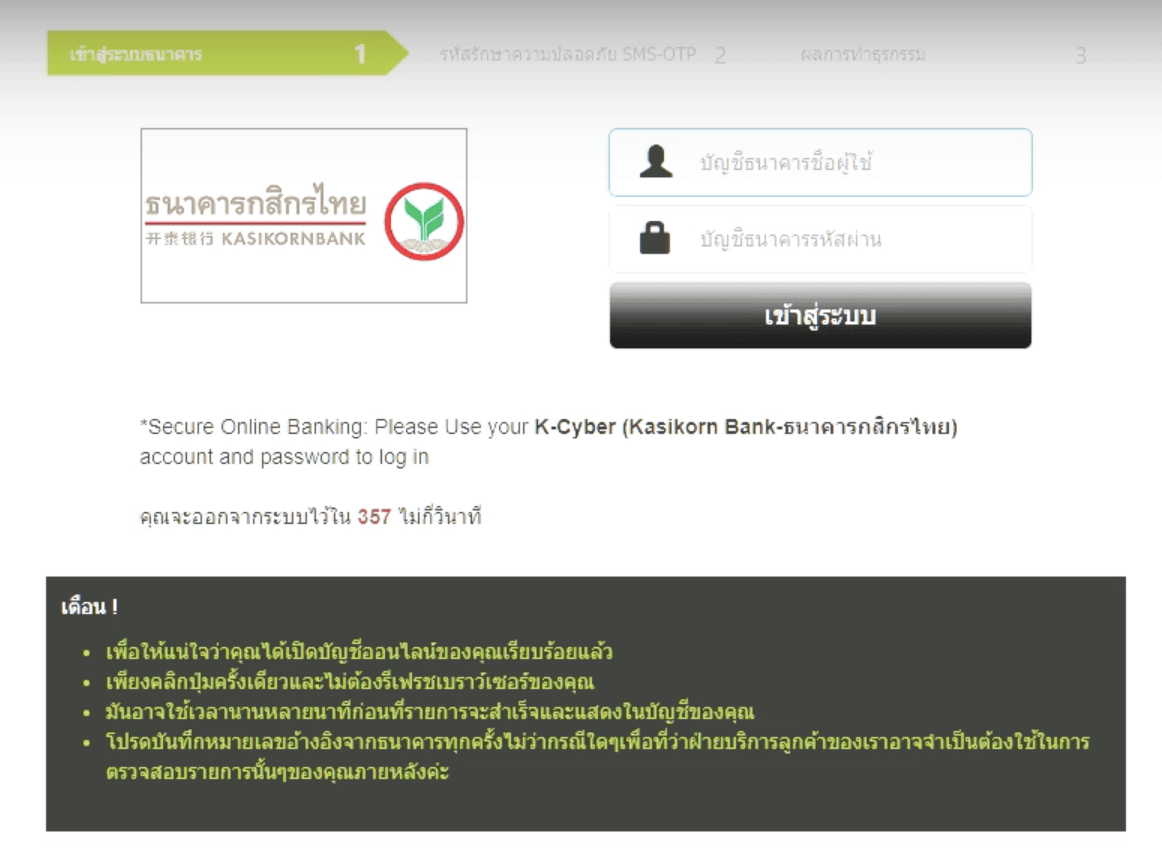
If everything has been specified correctly, the funds will be credited to your Olymptrade account immediately.
Having Troubles with Making a Deposit on Olymptrade from Thailand?
If you are using a bank transfer or a bank card, but keep failing due to some error, here is what you can do:- Call the bank, find out the reason for the transaction error.
- If the above step did not solve the problem, we recommend using Skrill, Neteller or WebMoney electronic payment system in the way we described above. This method works 100%.
FAQs
Log into your Olymptrade account, open the Deposit page and select bank transfer or Kasikorn Bank if listed, enter the amount and copy the beneficiary details shown (account name/reference). Complete the transfer from your Kasikorn account, keep the transaction ID or screenshot, then upload the receipt in the Deposit history if prompted; local transfers typically post within a few hours but may take up to one business day.
The platform generally enforces a low minimum deposit that is displayed on the Deposit page for each payment method; this amount can vary by currency and by whether you choose card or bank transfer, so check the deposit widget before confirming the transaction.
Common causes are name mismatches, wrong reference, daily transfer limits, or your bank blocking payments to online brokers. Start by checking your bank statement and the transaction ID, confirm you used the exact beneficiary details shown by Olymptrade, verify 3D Secure or OTP steps completed for card payments, then contact support with the receipt and transaction ID so they can reconcile or advise next steps.
Yes. Withdrawals usually require completed identity verification and, for card deposits, proof of card ownership; many platforms also return funds to the original payment method when possible. Complete KYC, upload the requested documents, and be prepared for the platform to hold or route payouts according to its payment rules until verification is approved.
Olymptrade accepts major card networks but availability depends on your country and card issuer; some international cards are accepted while others may be blocked for cross-border merchant processing. Confirm the accepted card list on the Deposit page, ensure 3D Secure is enabled, and contact your card issuer if a card transaction is declined.